
Bybit sign-up at a glance
Bybit · Referral Code
CRYPTPERKS| Item | Detail |
|---|---|
| Referral code | CRYPTPERKS |
| Offer on our sign-up page[1] [4] | Rewards of up to $30,000, starting at $50 for a $500 deposit and $100k of taker trading volume (page seen 29 September 2026). Standard KYC is required before Rewards Hub rewards can be claimed. |
| Sign-up methods[2] | Email address or phone number, or Google, Apple or Telegram. Bybit recommends email, because email and Google Authentication are compulsory to withdraw. |
| Order of screens[2] | Country of residence, email or phone, referral or affiliate code, recaptcha and a code sent by email or SMS, then your password. |
| Where the code goes[2] | Our link pre-fills the referral code; if you type it yourself, enter it before clicking Sign Up Now. Bybit says it cannot be added, changed or deleted after the account exists. |
| Add a code later?[3] | Only a code from a Bybit Affiliate, within 14 days of registering, on a main account with no referrer; it cannot be changed afterwards. |
| KYC levels[5] | Standard (identity assessment and proof of identity), Advanced (adds proof of address) and Pro (adds enhanced due diligence). |
| Daily crypto withdrawal limit[6] | Up to 20K USDT without verification, up to 1M USDT with Standard and up to 2M USDT with Advanced or Pro (non-VIP users). |
| KYC review[6] | Generally about 15 minutes, at times up to 48 hours. |
| Minimum deposit[8] | Set per coin on the Crypto Deposit/Withdrawal Status page; a deposit below it is not credited or refunded. |
| Not available in[7] | The United States, the Chinese Mainland, Hong Kong, Singapore, Canada, North Korea, Cuba, Iran, Uzbekistan, Sudan, Syria and other listed places (list below). |
Facts are from Bybit's help center, read on 30 September 2026 unless a row says otherwise. The numbers in brackets point to the sources at the foot of the page.
20% lower trading fees through this link
Step 1: Start from our link
The button above opens Bybit's registration page with the code CRYPTPERKS already filled in. If you go to Bybit yourself, click Sign Up in the top-right corner of the website homepage [2]; the app follows the same sequence.
Whichever way you arrive, attach the referral or affiliate code before you press Sign Up Now: our link pre-fills it, and Bybit says a code cannot be added, changed or deleted once the account exists [2]. There is one narrow exception, covered in Step 3.
Step 2: Select your country and click Create Account
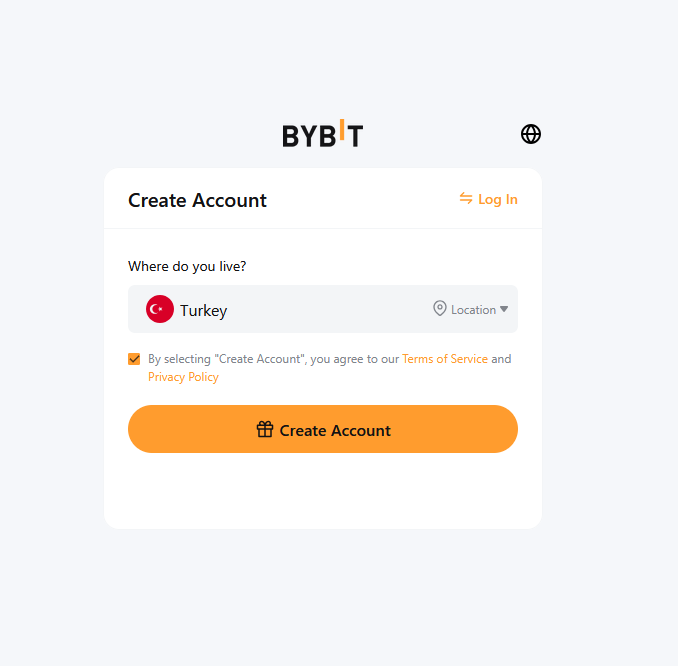
Bybit first asks for your country of residence. It may send you to one of its regional sites or show a restricted-country notice [2]. Tick the Terms of Service checkbox if it is not already ticked, then press Create Account.
Bybit's restrictions follow your nationality, not only where you live now: its KYC FAQ says restrictions are determined by the trader's nationality, not current place of residence [6].
Step 3: Check the referral code field
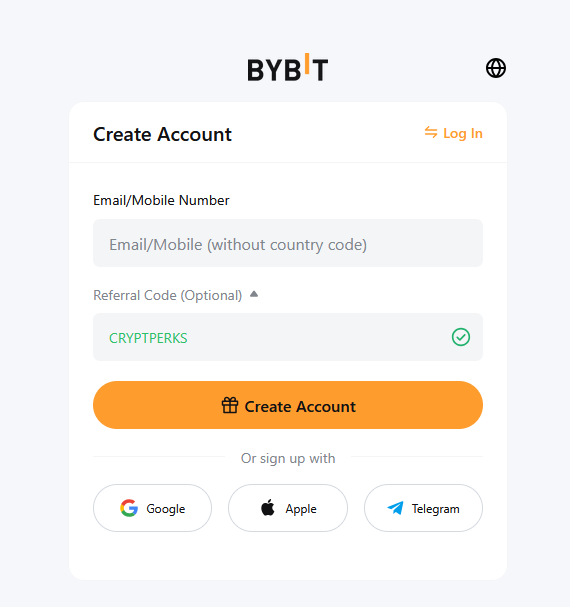
On the registration form, click "Referral Code (Optional)" to expand the field and type CRYPTPERKS. In our screenshot a green checkmark appeared when the code was accepted; if you came through our link it is already filled in, so just confirm the checkmark.
Missed it? Bybit's help article on adding an affiliate code says accounts with no registered affiliate or referral code can add an invitation code manually within 14 days after registration. Only the main account can do this, only a code provided by a Bybit Affiliate (not one from the Referral Program) is supported, and once added it cannot be cancelled or changed. On the website, go to Account > Account Info > Join an Affiliate's Community [3].
Step 4: Enter your email address and click Create Account
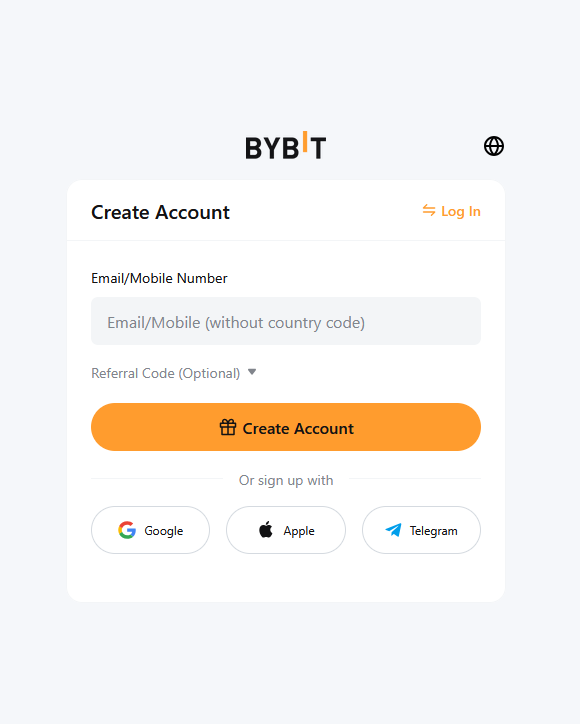
Enter your email address or phone number. For a phone number, add the country code and leave out the leading zero: Bybit gives 9012345678 as the entry for 090-1234-5678. Each email address and mobile number can be linked to only one account, and Bybit wants single-byte alphanumeric characters [2].
The Sign Up With buttons create the account from Google, Apple (including a Hide My Email address) or Telegram instead [2].
Step 5: Verify your email with the 6-digit code
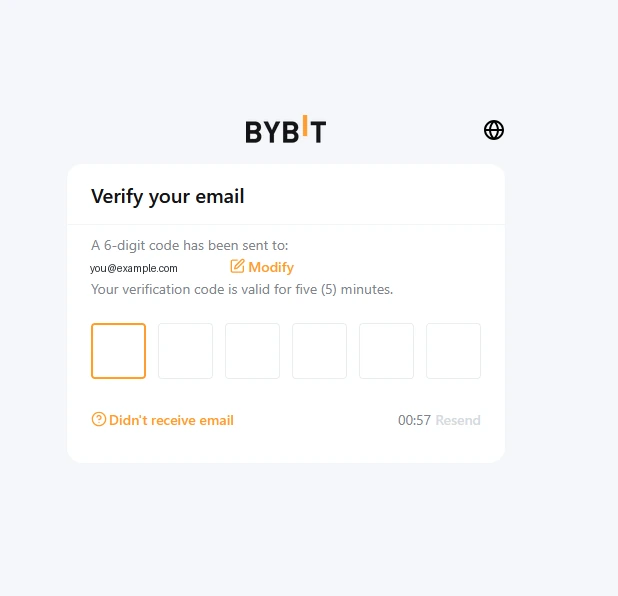
Complete the recaptcha, then enter the verification code Bybit sends to your email address or mobile number [2]. In our screenshot the code had six digits and a 5-minute validity, with a Resend button. If nothing arrives within a minute, check spam or junk.
Step 6: Create a strong password
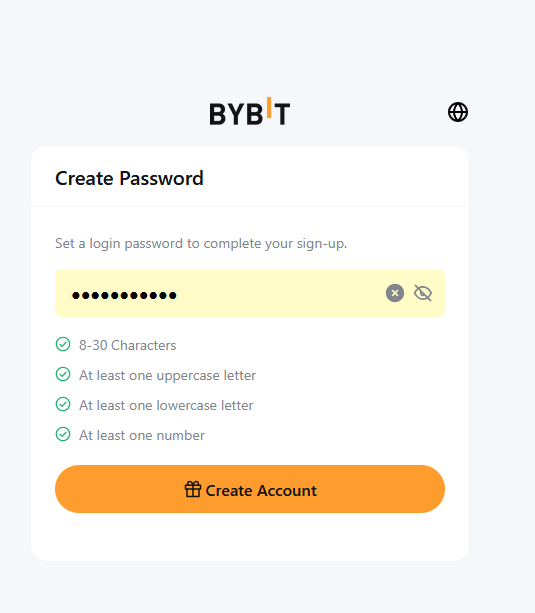
Bybit asks for your account password once the verification passes [2]. The rule on the screen we captured was 8 to 30 characters with at least one uppercase letter, one lowercase letter and one number; follow whatever your screen shows.
You are then taken to your Account Dashboard, where Bybit points you to Identity Verification to access all its products and services [2].
Step 7: Verify your identity
| Level | What it needs | Daily crypto withdrawal limit |
|---|---|---|
| No verification | Nothing | Up to 20K USDT a day, up to 100K USDT a month |
| Standard | Identity assessment and proof of identity | Up to 1M USDT a day, no monthly limit |
| Advanced | Proof of address | Up to 2M USDT a day, no monthly limit |
| Pro | Enhanced due diligence questionnaire and proof of income | Up to 2M USDT a day, no monthly limit |
Sources: Bybit FAQ — Individual KYC (updated 20 August 2026) and How to Complete Individual KYC Verification (updated 6 July 2026), read 30 September 2026. Limits shown are for non-VIP users and count in USDT. [5][6]
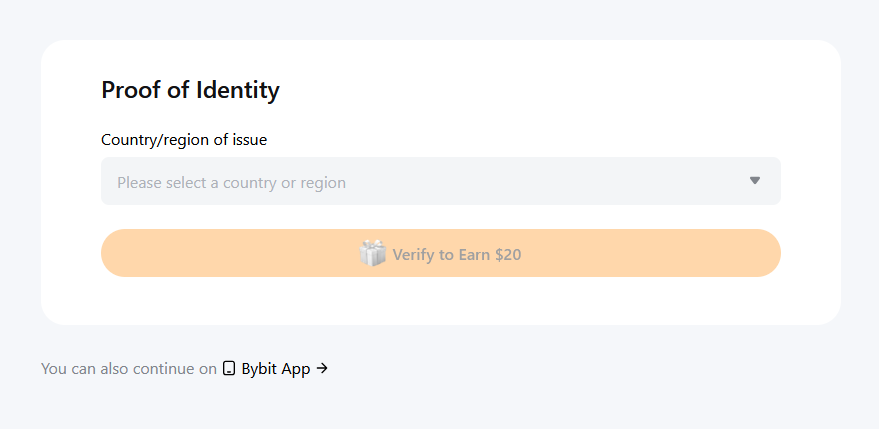
Bybit says identity verification of at least the Standard level is mandatory for all its products and services, and that only main accounts can verify [6]. The path: profile icon, then Account, then Verify Now in the Identity Verification column, then your country of residence [5].
Proof of identity: pick the country that issued your document and its type, photograph it so that your full name and date of birth are clear, and complete facial recognition on your laptop camera or by scanning a QR code with your phone. Bybit accepts a passport, identity card, residence permit or driving licence issued by your country of origin; a domestic passport or any visa is not accepted, and it takes physical documents, not e-copies or scanned images [5][6].
Standard verification ends with an automatic identity assessment, though some users are asked to complete a questionnaire. Advanced proof of address must be a utility bill, bank statement or government residence proof dated within the last three months [5].
Generally verification takes about 15 minutes, but it can take up to 48 hours; after that, Bybit says to submit a case to customer support [6].
Your first deposit
Crypto: click Deposit in the upper right of the Bybit page or on your Funding page, choose the coin and the blockchain, and note the confirmations required. Deposits land in the Funding Account by default, and you can switch the destination to your Unified Trading or Earn Account on the Deposit or Settings page [8].
Minimum: Bybit publishes the minimum for each coin on its Crypto Deposit/Withdrawal Status page rather than as one figure. Deposits below the minimum are not credited or refunded, and sending a coin or a blockchain not on the list can mean permanent loss [8]. Without verification, Bybit's benefits table marks crypto deposits as unavailable [4].
Card: One-Click Buy needs individual identity verification. Per-order limits are under 10,000 USD with Standard and up to 10,000 USD with Advanced or Pro; daily totals are up to 20,000 USD and 50,000 USD. The supported currencies and their fees depend on the payment method, so check the One-Click Buy page [9].
What you will pay
The table shows Bybit's standard-tier (VIP 0) spot and futures fees as CryptPerks records them, and they match Bybit's Trading Fee Structure article updated 2 September 2026. Bybit adds that the actual rate can vary by region and points to the My Fee Rate page after verification [10].
Standard trading fees on Bybit
| Market | Maker | Taker |
|---|---|---|
| Spot | 0.10% | 0.10% |
| USDT-margined futures | 0.02% | 0.055% |
Standard-tier (VIP 0) rates from the comparison data CryptPerks keeps for all six exchanges. Your own rate depends on your region, VIP tier and promotions, and referral rebates or vouchers are separate from it. Check the exchange's fee page before you trade.
Country availability
Bybit's Service Restricted Countries page (updated 1 September 2026) says it does not offer services or products in the United States, the Chinese Mainland, Hong Kong, Singapore, Canada, North Korea, Cuba, Iran, Uzbekistan, the Russian-controlled regions of Ukraine (currently including Crimea, Donetsk, Rostov and Luhansk), Sevastopol, Sudan and Syria, plus Dubai for its Virtual Asset Platform Operator entity, or in any other place it decides to exclude. It also does not serve persons on the US, EU or UK sanctions lists, or persons in Seychelles other than qualifying companies [7].
The list is Bybit's, not ours, and it does not say whether local rules allow you to use the exchange. Read the page before you register.
Need help?
No code arrives: check spam or junk, then use Resend. Enter the email address again carefully; each address can be linked to one account only [2].
Can't reach the facial recognition step: Bybit says the document may not meet the requirements or there were too many submissions in a short time. Try again after 30 minutes, then contact customer support [5].
Deposit missing: check whether it landed in your Unified Trading Account instead of the Funding Account, whether the amount was above the coin minimum, and whether the chain matched [8].
Sources
Every page below is an official Bybit page except the first, which is the sign-up page our own link opens. Pages were read on 30 September 2026; the dates in brackets are the dates the pages show. Offers change, so check Bybit before you deposit.
- [1]The Bybit sign-up page our link opens — seen 29 September 2026; we entered nothing on it
- [2]Bybit Help Center: How to Register an Account — updated 17 August 2026https://www.bybit.com/en/help-center/article/How-to-register-an-account
- [3]Bybit Help Center: How to Add and Check Registered Affiliate Code — updated 5 June 2026https://www.bybit.com/en/help-center/article/How-to-Add-and-Check-Registered-Affiliate-Code
- [4]Bybit Help Center: Benefits of Different Verification (KYC) Levels — updated 30 July 2026https://www.bybit.com/en/help-center/article/Benefits-of-Different-KYC-Levels
- [5]Bybit Help Center: How to Complete Individual Identity Verification (KYC) — updated 6 July 2026https://www.bybit.com/en/help-center/article/How-to-Complete-Individual-KYC-Verification
- [6]Bybit Help Center: FAQ — Individual KYC — updated 20 August 2026https://www.bybit.com/en/help-center/article/Individual-KYC-FAQ
- [7]Bybit Help Center: Service Restricted Countries — updated 1 September 2026https://www.bybit.com/en/help-center/article/Service-Restricted-Countries
- [8]Bybit Help Center: FAQ — On-Chain Crypto Deposits — updated 14 August 2026https://www.bybit.com/en/help-center/article/Bybit-Deposit-FAQ
- [9]Bybit Help Center: FAQ — One-Click Buy — updated 28 September 2026https://www.bybit.com/en/help-center/article/FAQ-One-Click-Buy
- [10]Bybit Help Center: Bybit Trading Fee Structure — updated 2 September 2026https://www.bybit.com/en/help-center/article/Trading-Fee-Structure