
Bitget sign-up at a glance
Bitget · Referral Code
cryptperks| Item | Detail |
|---|---|
| Referral code | cryptperks |
| Offer on our sign-up page[1] [11] | Titled "Sign up with Bitget and earn 6,200 USDT rewards": a 200 USDT welcome pack plus a deposit-and-trading challenge worth up to 6,000 USDT (page seen 29 September 2026). |
| Sign-up methods[2] [3] | Email or mobile number; the website also offers Google, Telegram and wallet sign-in. |
| Password[2] [3] | 8 to 32 characters, with at least one number, one uppercase letter and one special character. |
| Verification code[2] [3] | A 6-digit code sent by email or SMS. |
| Where the code goes[1] [2] | The optional "Referral code" line on the sign-up form, collapsed by default. Our link fills it in. |
| Add the code later?[2] [3] | Add the code when you sign up: our link pre-fills it. Bitget documents no way to add one afterwards. |
| Identity verification[5] [6] | Required for crypto deposits and trading; reviews typically take up to 60 minutes, and the KYC guide says 1 business day; 5 attempts within 24 hours. |
| What you upload[4] | A photo of your ID showing full name and date of birth, unedited, then a facial recognition check; accepted document types depend on your country. |
| Minimum deposit[9] | No single figure: it varies by coin, and a deposit below it is not credited. |
| Not available in[7] | Canada, the United States, Germany, France, Austria, Japan, Singapore, Thailand, Malaysia, Hong Kong and other listed places (list below). |
Facts are from Bitget's own pages, read on 30 September 2026 unless a row says otherwise. The numbers in brackets point to the sources at the foot of the page.
20% lower trading fees through this link
Step 1: Open the Bitget sign-up page
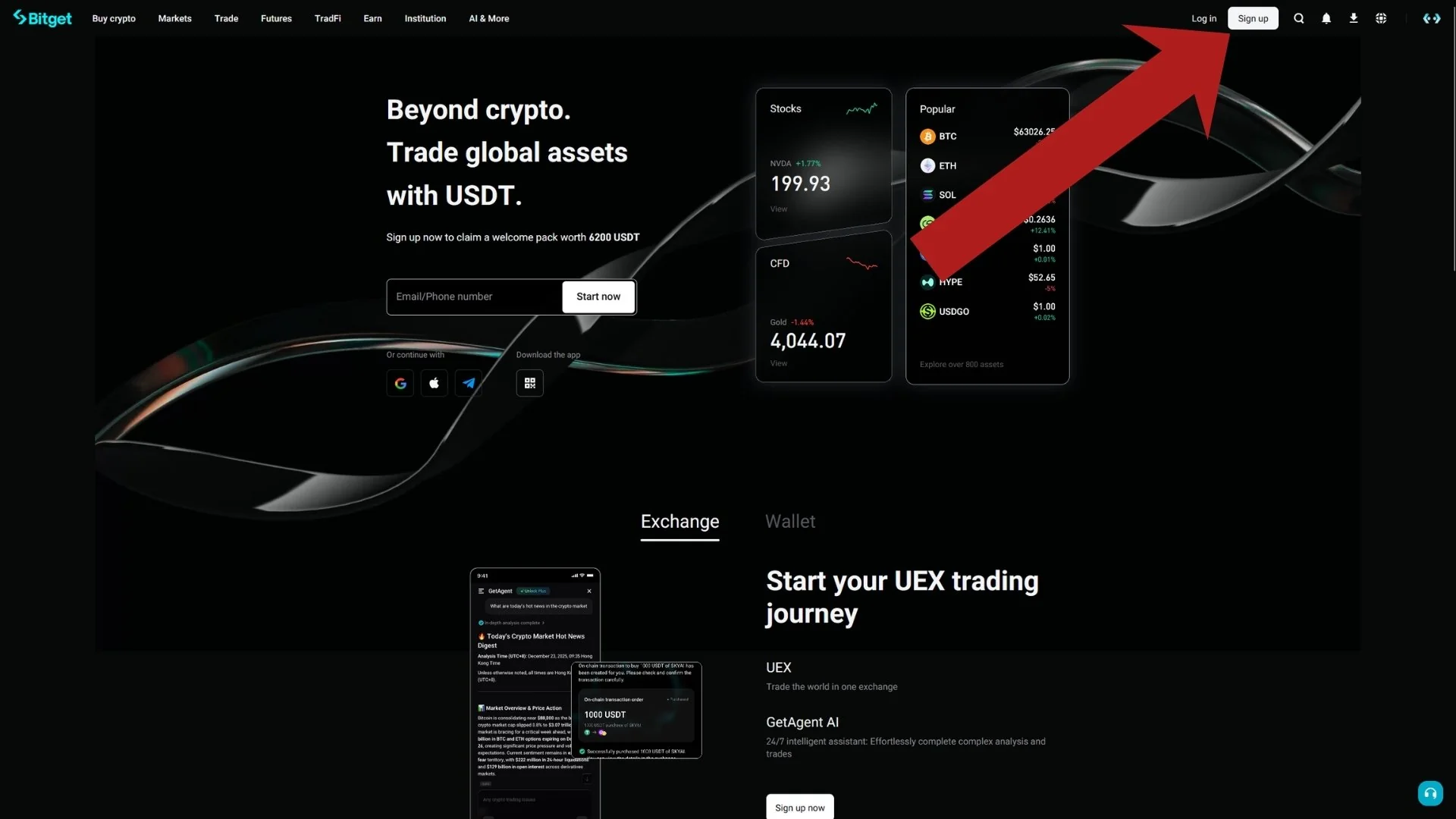
Our link opens Bitget's registration form with the referral code already in it. If you go to Bitget yourself, click the Sign up button in the top-right corner of the homepage; Bitget's website guide starts the same way [2]. You can also start from the email field in the middle of the homepage.
Step 2: Find the referral code field on the sign-up form
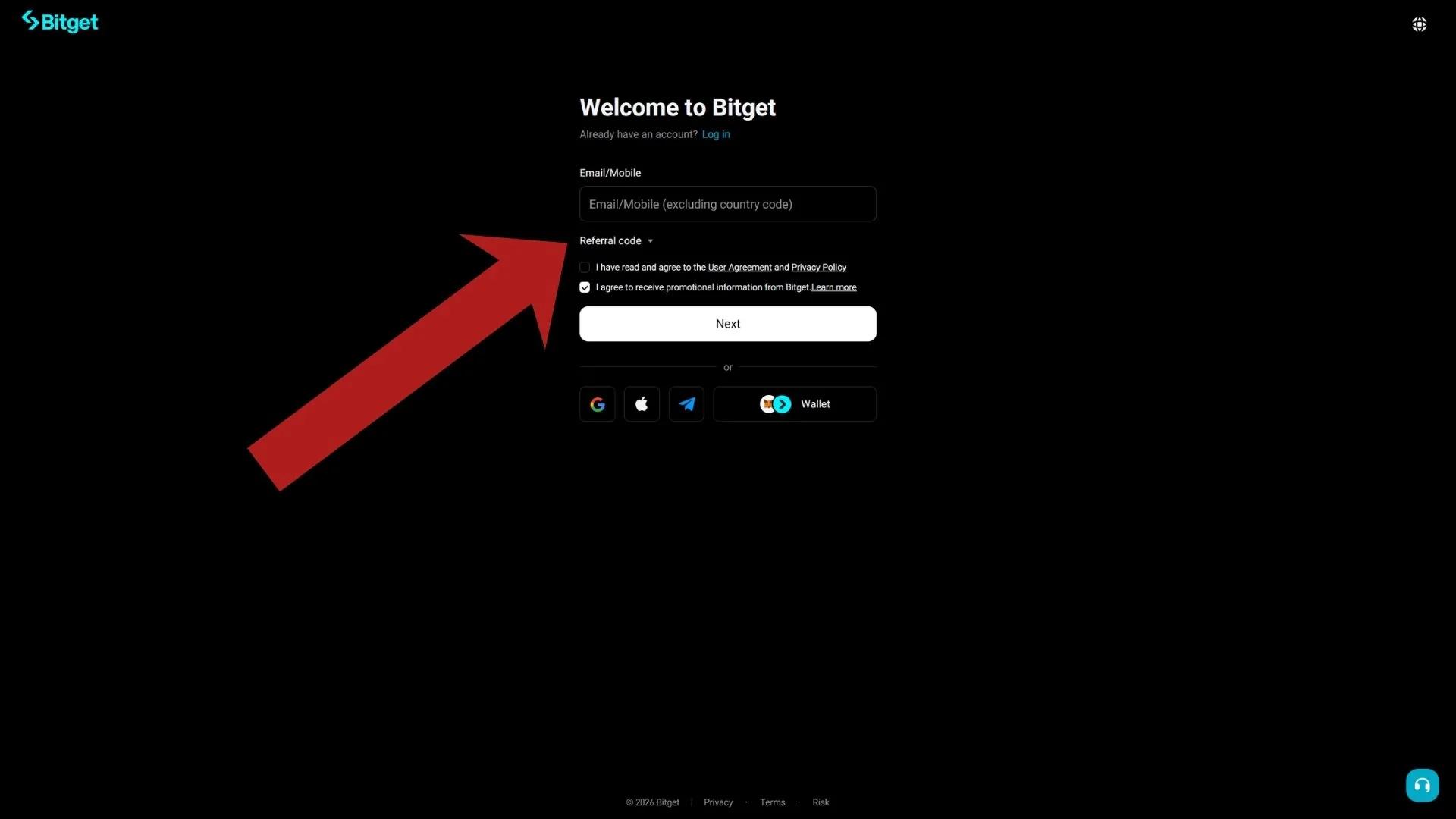
The "Welcome to Bitget" form asks for an email address or phone number. Under it sits a collapsed line labelled "Referral code" with a small arrow, and clicking it expands the input. Bitget's web guide calls the referral code optional and lists email, mobile number, Google, Telegram and wallet as sign-up methods [2].
If you arrived through our link, the code is already filled in and you can skip to Step 4.
Step 3: Enter your email and the referral code cryptperks
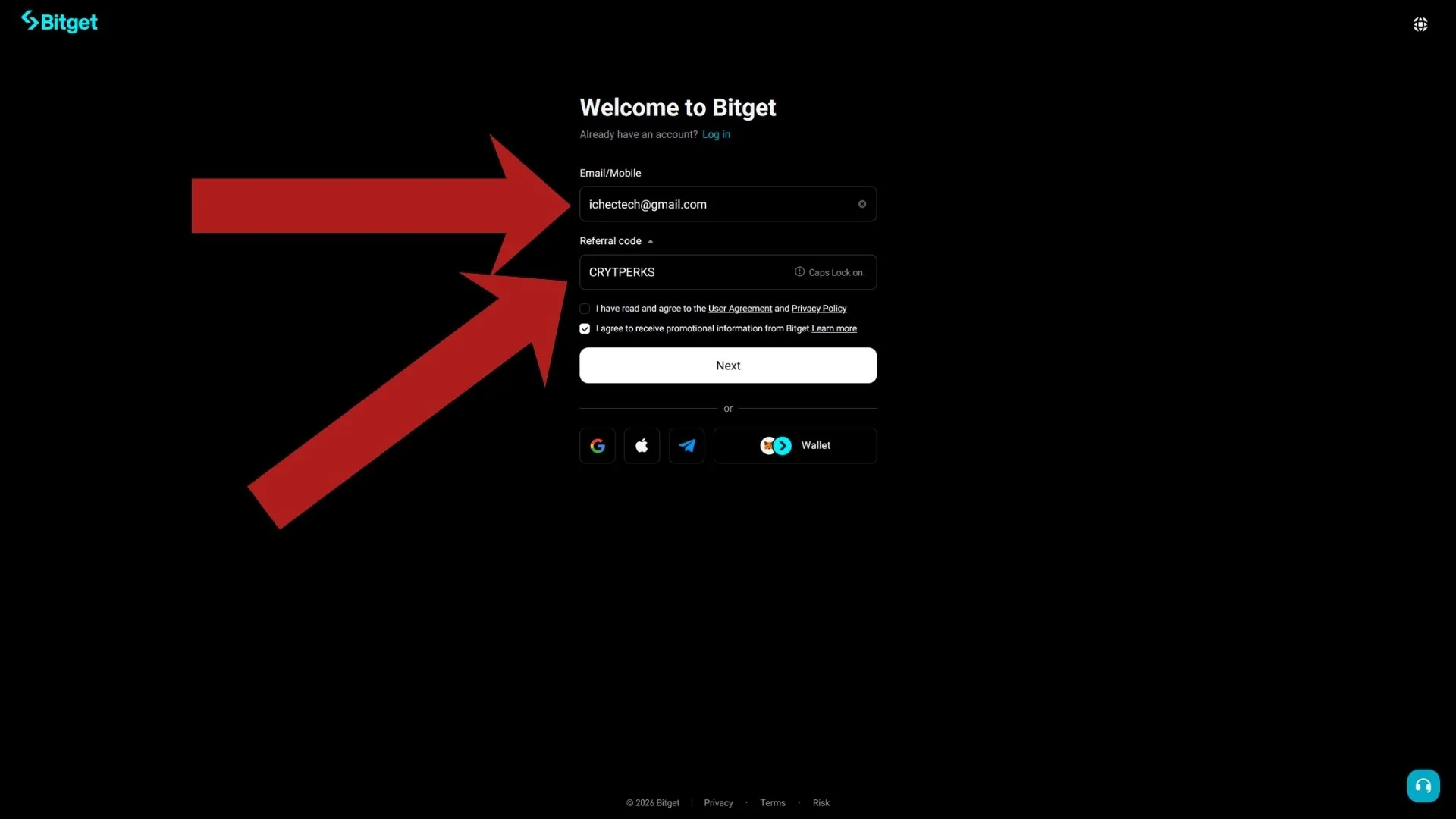
Type your email address into the top field and double-check it: this is where your verification code arrives. Then enter cryptperks, all lowercase, in the referral code field.
Enter it now: our link pre-fills it. Bitget documents no way to add a referral code after registration [2][3].
Step 4: Accept the User Agreement
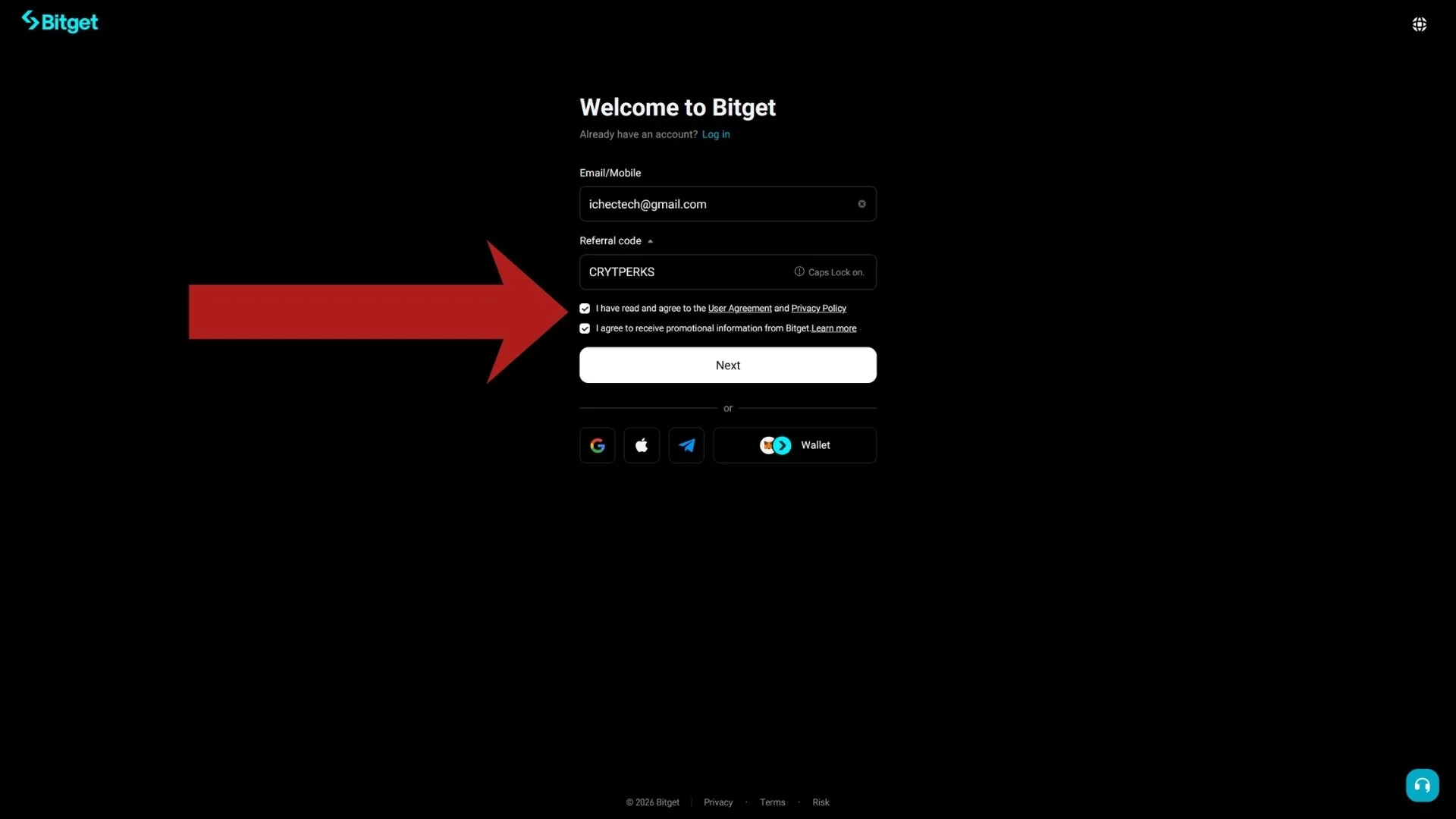
Tick the first checkbox to accept the User Agreement and Privacy Policy; the app guide lists that agreement too [3]. The second checkbox in our screenshot is for promotional emails and is optional.
Step 5: Press Next to submit the form
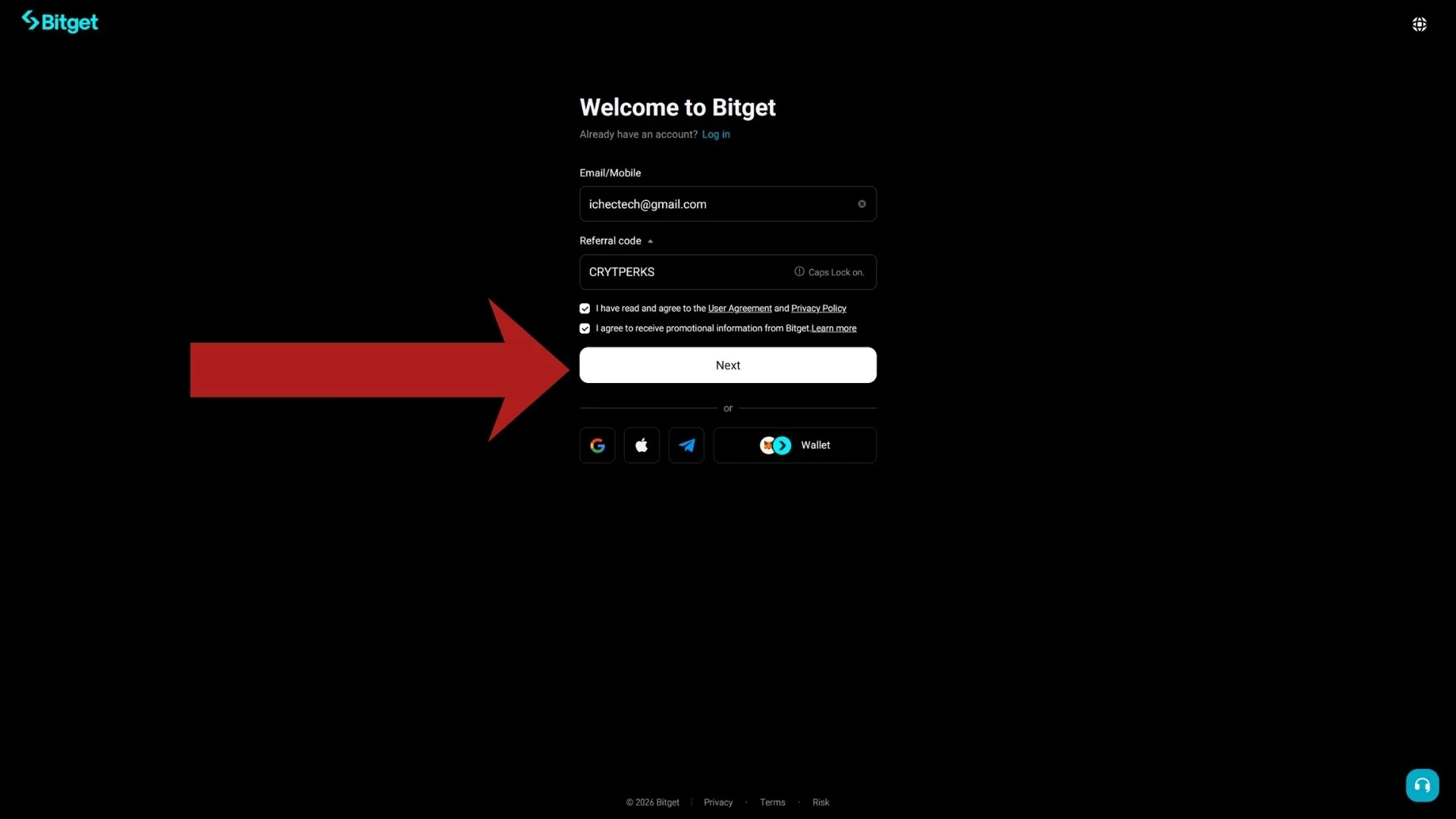
Confirm the referral field still shows cryptperks, then press Next. Bitget moves you on to password creation [2].
Step 6: Set a strong password
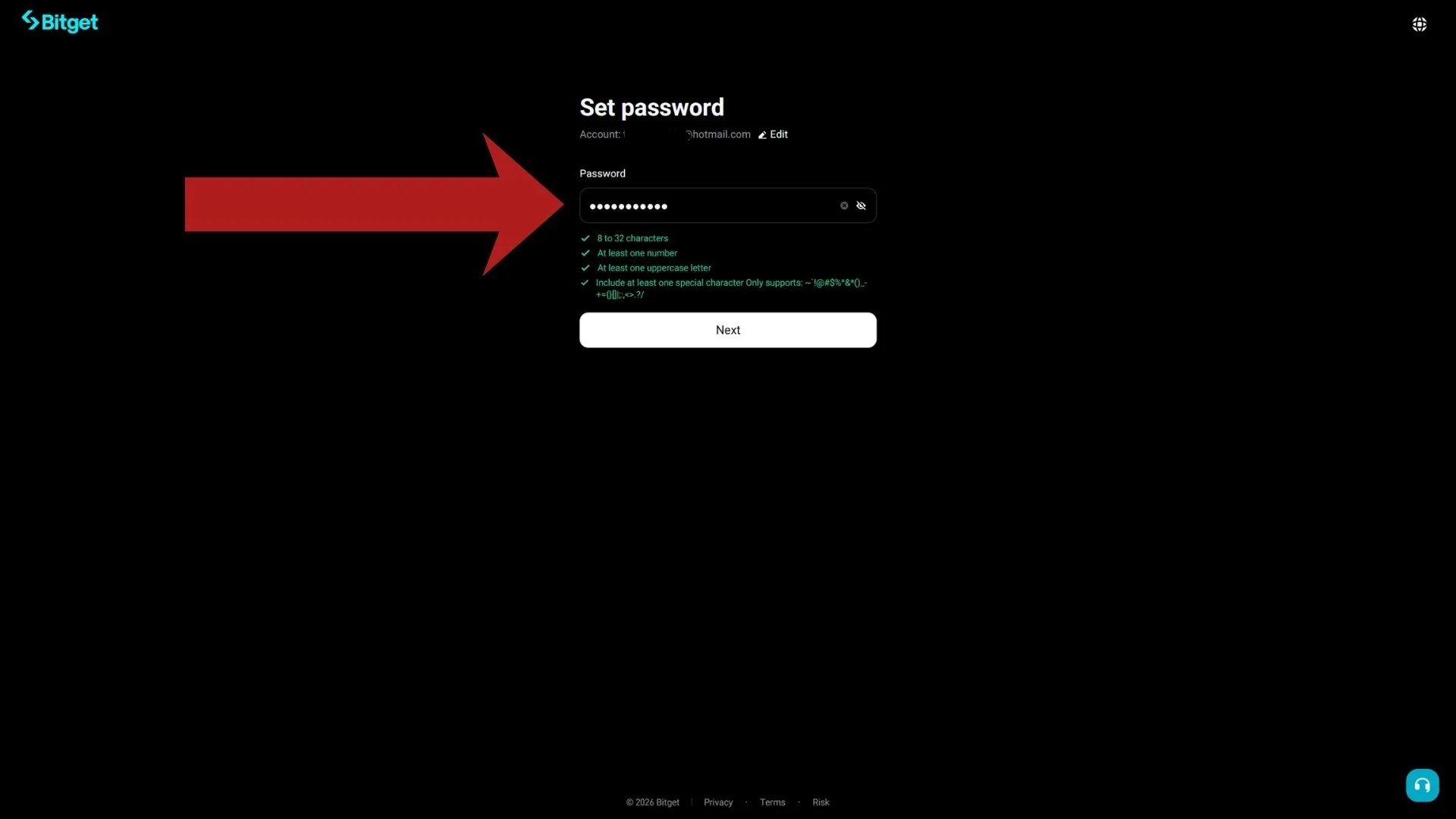
Bitget requires 8 to 32 characters including at least one number, one uppercase letter and one special character [2][3]. In our screenshot each requirement turns green when it is met. The web guide also asks you to solve a captcha at this point [2].
Use a password you use nowhere else; a password manager is the easiest way to generate one.
Step 7: Continue to email verification
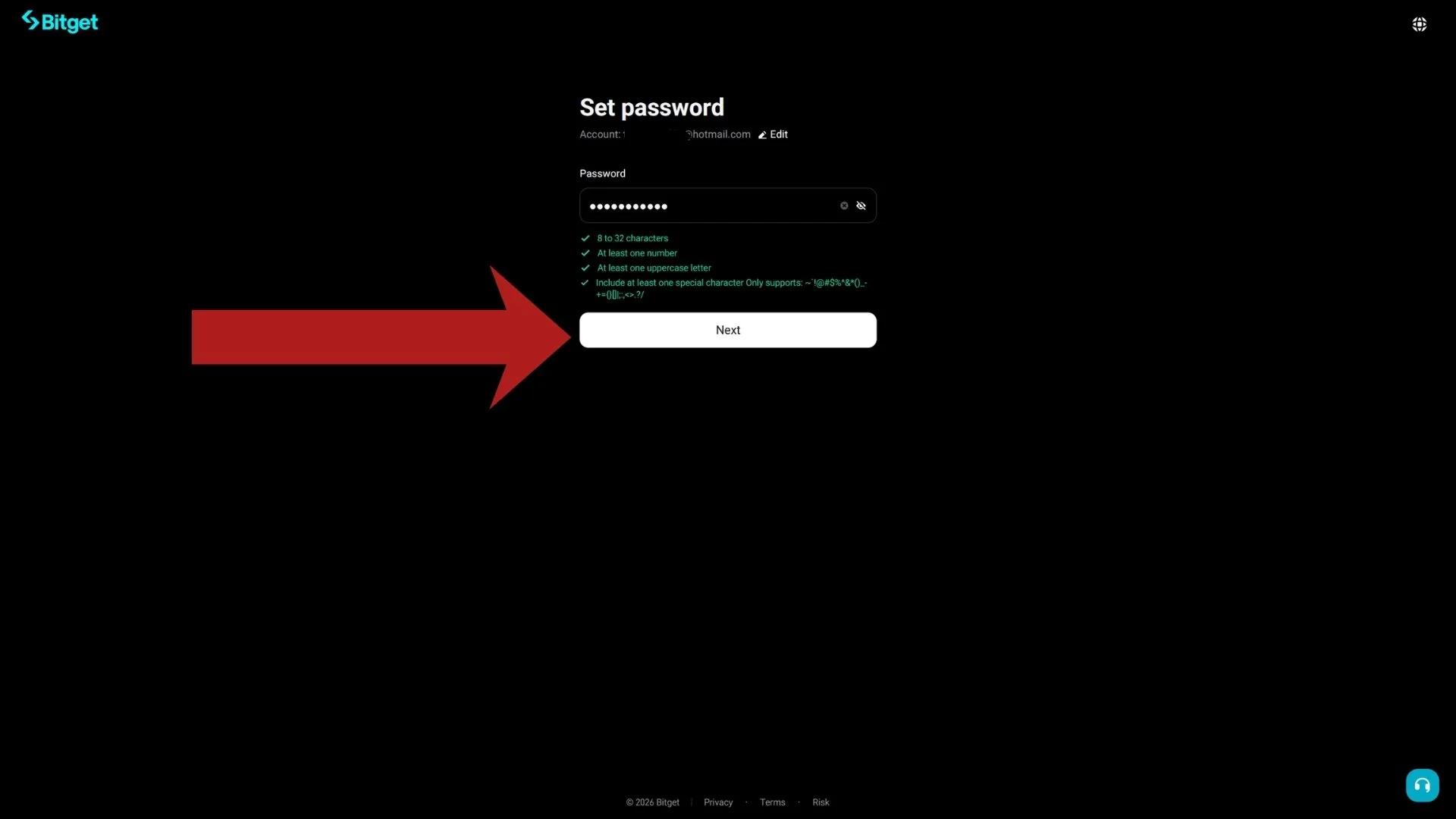
When all four checks are green, press Next. Bitget sends a 6-digit verification code to the email address you entered [2].
Step 8: The verification code screen
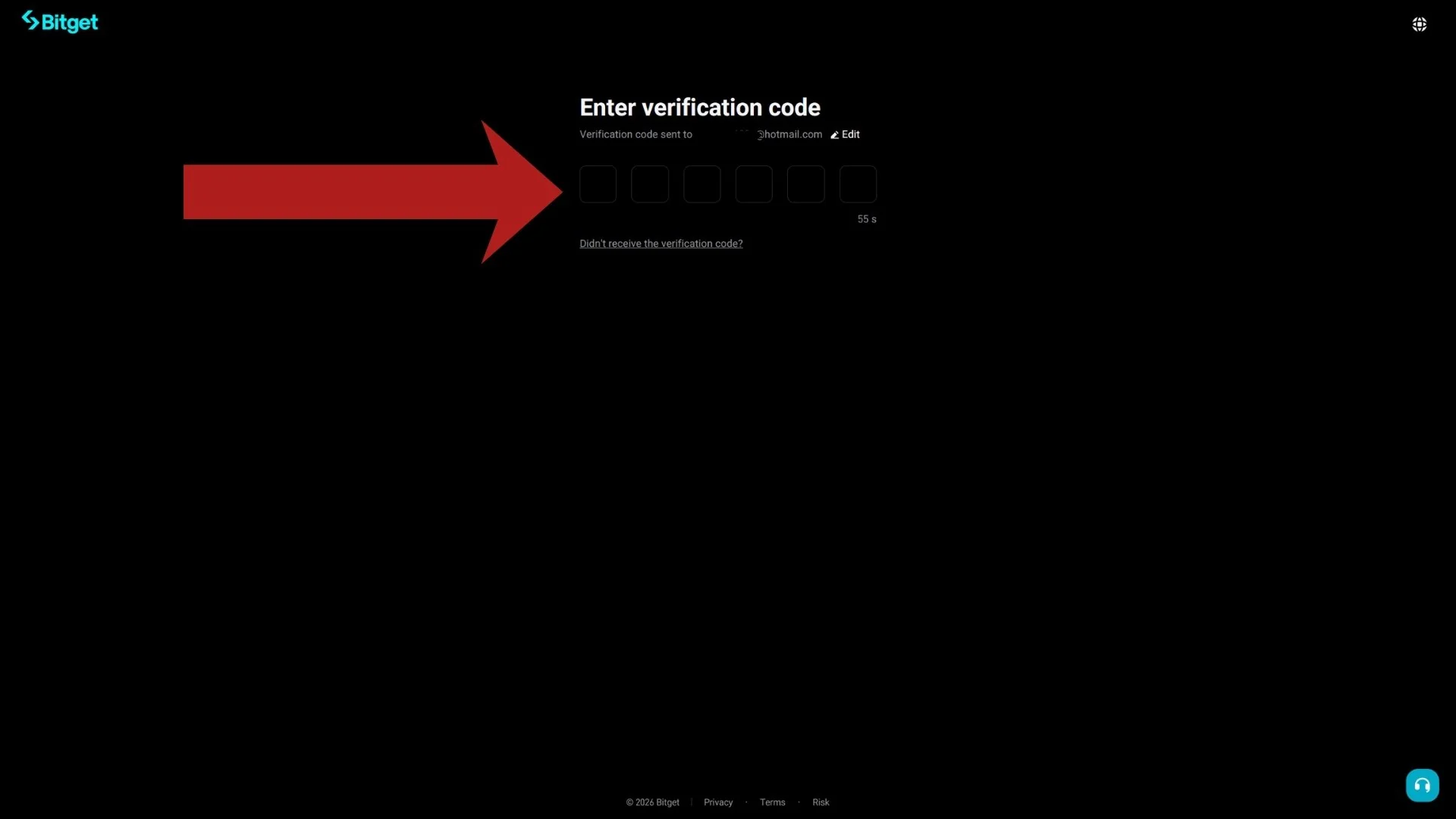
This screen waits for the 6-digit code. Keep it open and switch to your inbox in another tab. If nothing arrives within a minute, check spam, then use "Didn't receive the verification code?" once the countdown allows it.
Step 9: Find the Bitget email in your inbox
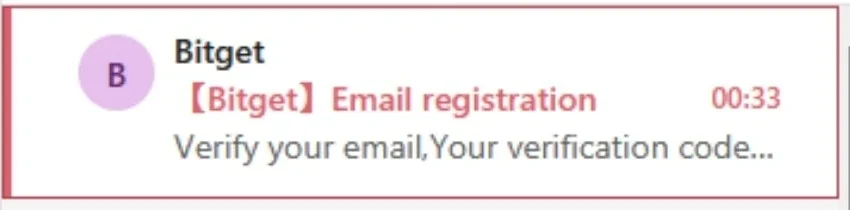
In our test the email came from a bitget.com address with the subject "Email registration". If it is not in the main inbox, look under Spam or the Other tab.
Step 10: Copy the 6-digit code
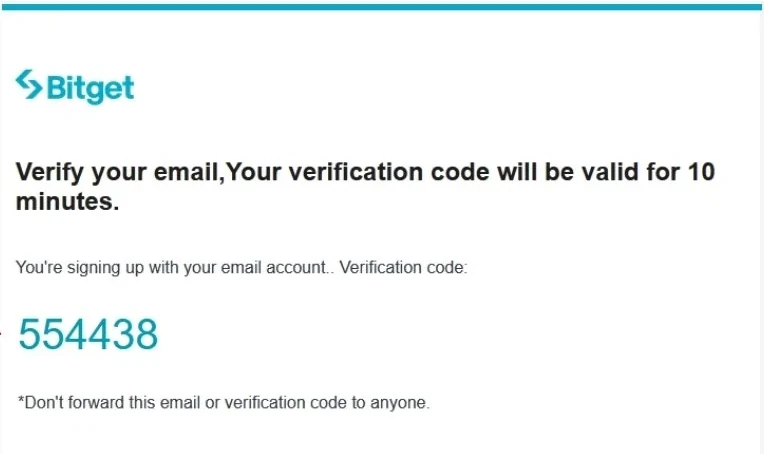
Open the email, copy the 6-digit code and type it into the six boxes on the Bitget tab; the account is created when it is accepted [2].
Never share this code with anyone. If a message or a call asks for it, that is a scam.
Step 11: Your account is live: now verify your identity
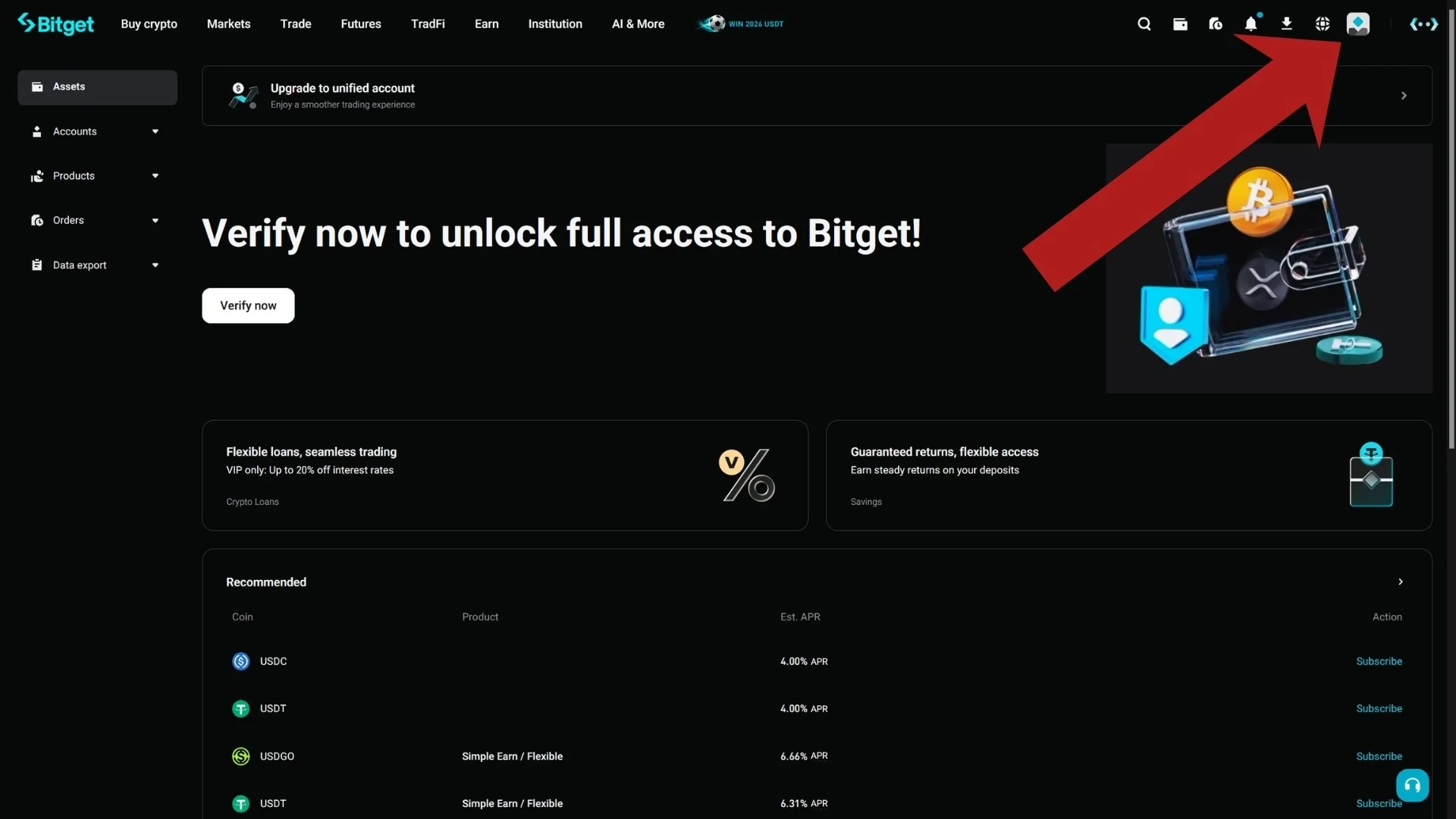
You land on the Bitget dashboard. Bitget says identity verification is required to access core services such as crypto deposits and trading [5]. Click the Verify now banner, or open the profile icon in the top-right corner.
Step 12: Open Identity verification from the profile menu
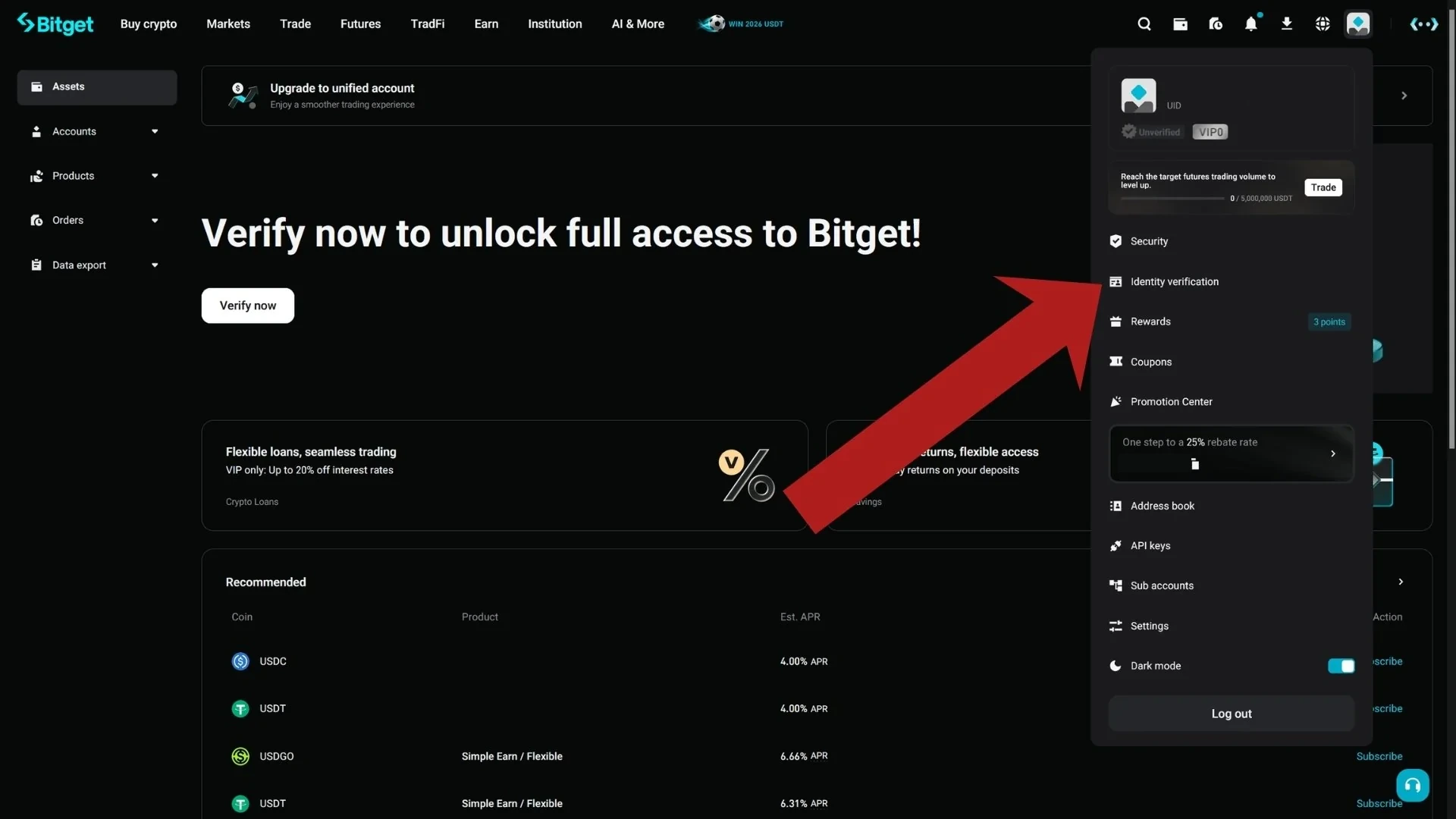
The dropdown shows your UID, VIP level and the menu entries. Bitget's identity guide gives the website path as profile icon, then Identity Verification, then Verify [4]. In our screenshot the menu also showed a banner with the referral code attached to the account.
Step 13: Start identity verification
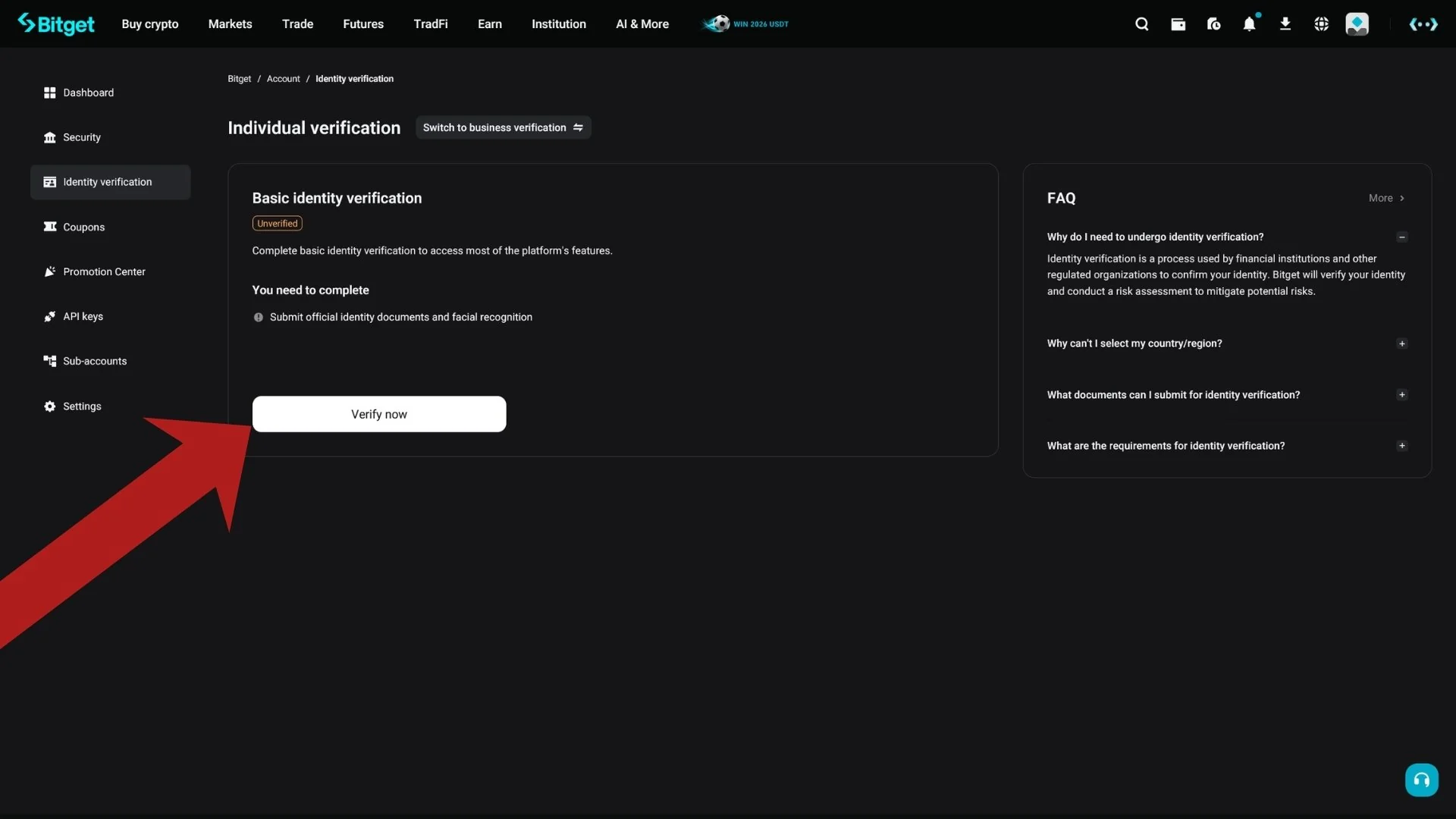
The Individual verification page lists what you will complete: an official identity document and a facial recognition check. Press Verify now to begin. Bitget says both the website and the app can be used, with a QR code to switch between them [4].
Step 14: Select your country and document type
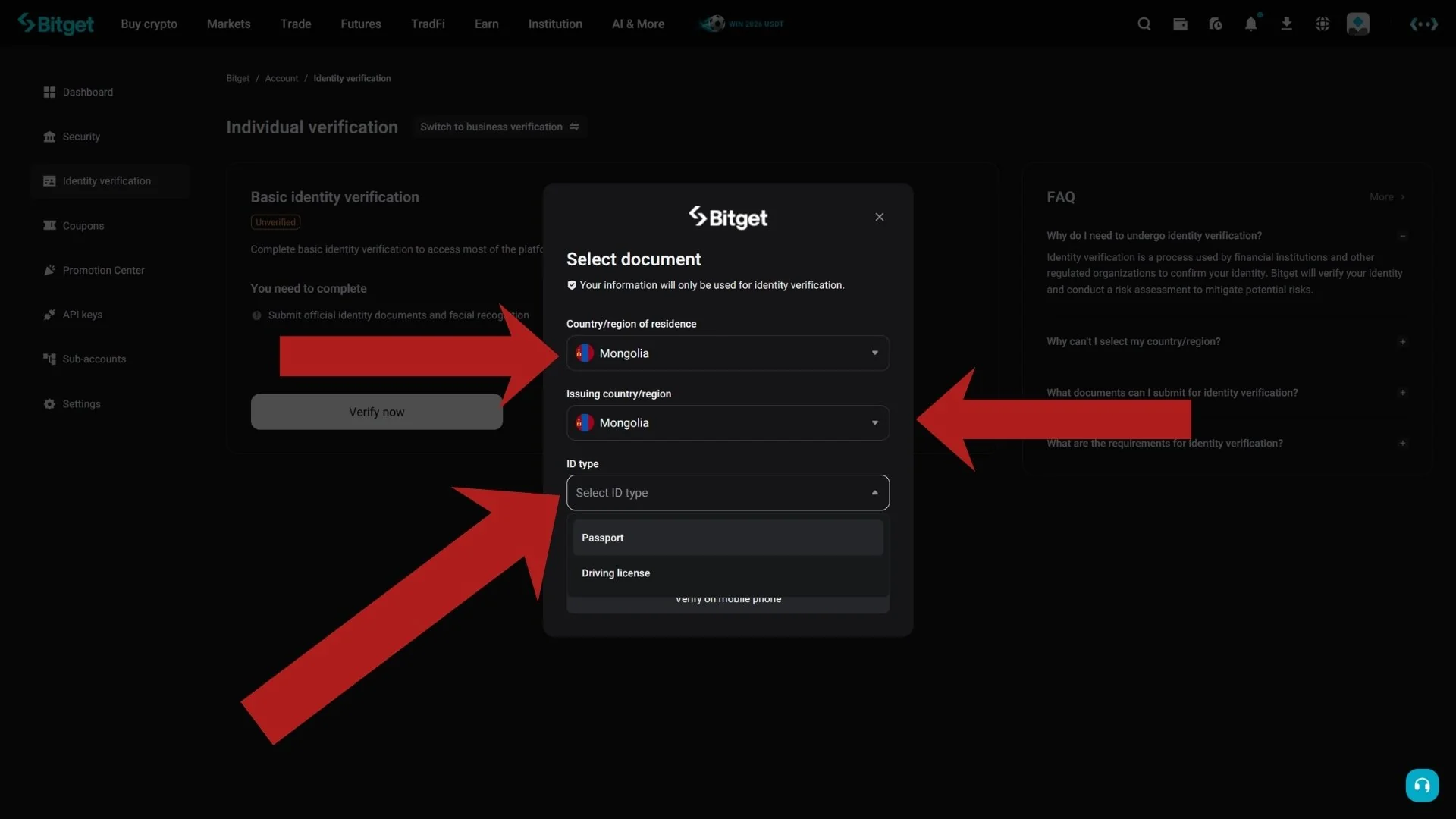
Choose your country or region and the ID type; Bitget says the document types vary by country [4]. Review Bitget's guidelines, then upload the front of the document, or front and back, depending on the type. The photo must clearly show your full name and date of birth, and the document must not be edited in any way [4].
Enter your full name as it appears on the document [6].
Final step: facial recognition
After the upload, Bitget asks for a facial recognition check. Its KYC guide asks for a plain background, good lighting and nothing that hides your face, such as accessories [6]. Then you wait: results arrive by email or in your Bitget inbox [4].
Bitget gives two review times: its verification FAQ says reviews typically take up to 60 minutes [5], while its website KYC guide says processing typically takes 1 business day [6]. You can attempt identity verification up to 5 times within 24 hours; after that you wait 24 hours [5]. If it takes longer than expected, Bitget tells you to submit a support ticket with your UID [6].
The FAQ also lists 24-hour withdrawal limits by VIP level, starting at 3 million USDT for VIP 0 [5].
20% lower trading fees through this link
Your first deposit
Crypto: Bitget's deposit guide has you open the profile menu, choose Deposit, pick the coin and the network, choose the destination account (Spot or Funding), then copy the address or scan the QR code. It says Bitget charges no deposit fee (network fees may apply), that you should always use the address shown for the current deposit, and that a wrong network can mean permanent loss [8].
Minimum: Bitget publishes no single minimum. Its troubleshooting article says deposits below the minimum required amount are not credited, that the minimum varies by cryptocurrency and is shown on the deposit page, and that coins such as XRP, XLM and BNB need a tag or memo [9].
Card: Bitget's card guide requires completed verification first, accepts Visa and Mastercard, Google Pay and Apple Pay, requires the card to be in your own name and to match your KYC details, uses 3D Secure, and mentions a 1.8% transaction fee in the purchase review step [10].
What you will pay
The table shows Bitget's standard-tier spot and futures fees as CryptPerks records them, last checked against Bitget's fee page in September 2026 [12]. Your own rate depends on your region, VIP level and promotions, so check the fee page after you sign up.
Standard trading fees on Bitget
| Market | Maker | Taker |
|---|---|---|
| Spot | 0.10% | 0.10% |
| USDT-margined futures | 0.02% | 0.06% |
Standard-tier (VIP 0) rates from the comparison data CryptPerks keeps for all six exchanges. Your own rate depends on your region, VIP tier and promotions, and referral rebates or vouchers are separate from it. Check the exchange's fee page before you trade.
Country availability
Bitget's Terms of Use (last updated 15 September 2026) require users to be at least 18 and list these Prohibited Countries: Austria, Canada, Crimea, Cuba, Donetsk, France, Germany, Hong Kong, Iran, Japan, Kazakhstan, Luhansk, Malaysia, North Korea, Singapore, Sudan, the United States and its territories, Iraq, Libya, Yemen, Afghanistan, the Central African Republic, the Democratic Republic of the Congo, Guinea-Bissau, Haiti, Lebanon, Somalia, South Sudan and Thailand. Bitget may designate further locations at its discretion [7].
The list is Bitget's, not ours, and it does not say whether local rules allow you to use the exchange. Read the Terms of Use before you register.
Need help?
No email code: check spam, then use the resend link once the countdown ends [2].
Verification rejected: Bitget sends the reason to your account or email, and you can retry up to 5 times in 24 hours [5]. Use an unedited photo of the original document with your full name and date of birth visible [4].
Deposit not showing: check the amount was above the coin's minimum, the network matched, and any required tag or memo was included; Bitget also offers a Self-Service Refund feature for unlisted coins or unsupported networks [9].
Sources
Every page below is an official Bitget page except the first, which is the sign-up page our own link opens. Pages were read on 30 September 2026; the dates in brackets are the dates the pages show. Offers change, so check Bitget before you deposit.
- [1]The Bitget sign-up page our link opens — seen 29 September 2026; we entered nothing on it
- [2]Bitget Help Center: How to Register a Bitget Account? — Website Guide — dated 16 April 2024https://www.bitget.com/support/articles/12560603808241
- [3]Bitget Help Center: How to Register a Bitget Account? — Mobile App Guide — dated 16 April 2024https://www.bitget.com/support/articles/12560603808267
- [4]Bitget Help Center: How to Complete Bitget Identity Verification — no date shownhttps://www.bitget.com/support/articles/12560603795184
- [5]Bitget Help Center: Common Questions About Individual Verification — dated 26 April 2024https://www.bitget.com/support/articles/12560603808893
- [6]Bitget Help Center: How to Complete KYC for My Bitget Account? — Website Guide — dated 29 April 2024https://www.bitget.com/support/articles/12560603808921
- [7]Bitget Terms of Use — last updated 15 September 2026https://www.bitget.com/support/articles/360014944032-terms-of-use
- [8]Bitget Help Center: How to Make a Cryptocurrency Deposit on Bitget — Website Guide — dated 26 June 2024https://www.bitget.com/support/articles/12560603811798
- [9]Bitget Help Center: Why Hasn't My Deposit Been Credited to My Bitget Account? — dated 29 March 2024https://www.bitget.com/support/articles/12560603807342
- [10]Bitget Help Center: How to Buy Crypto with Debit/Credit Card on Bitget? — Website Guide — dated 22 April 2024https://www.bitget.com/support/articles/12560603808556
- [11]Bitget Help Center: Bitget Rewards Center — dated 23 January 2025https://www.bitget.com/support/articles/12560603821815
- [12]Bitget trading fees page — read 30 September 2026https://www.bitget.com/fee